MetaTrader 4
アンドロイド

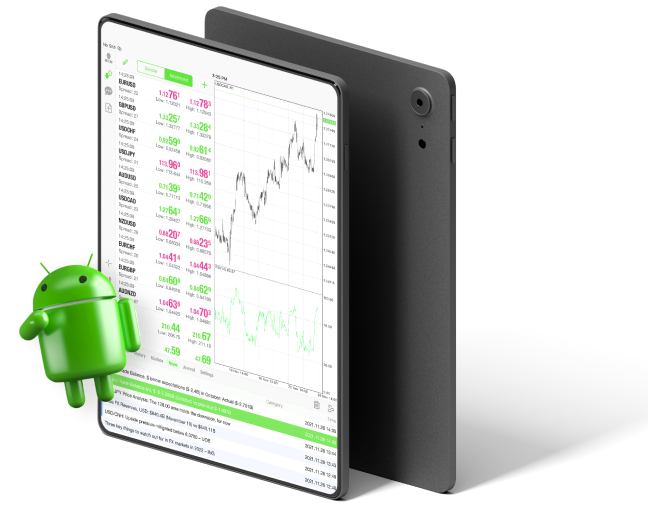
An image of an Android trading app displaying real-time stock market data and allowing users to buy and sell stocks.
T4Trade Logo on a Black Background: A Striking Emblem of Financial Excellence and Trading Precision
Blue circle on black background
a red cycle with black background
Blue Cycle on Black: A Symbol of Endless Motion

MetaTrader 4 で迅速かつ柔軟な取引を体験しよう(対応:) アンドロイド,

オンラインでの金融ニーズにモバイルアプリを利用するユーザーが増える中で、トレーダーや投資家もモバイルでの取引を好むようになっています。トレーダーにとっては、モバイルからMetaTrader 4にアクセスし、リアルタイムで 金融市場。トレーダーはAndroid版MT4を使って、いつでもどこでもFX取引を行い、最新の取引ツールや使いやすいインターフェースをあらゆるAndroidデバイスで楽しむことができます。今すぐGoogle Playからダウンロードして、その利点を体験しましょう。

すべての取引にはリスクが伴い、資本を全額失う恐れがあります。

すべての取引にはリスクが伴い、
資本を全額失う可能性があります。
A laptop displaying the Windows operating system on its screen.

Windows,

White laptop with blue apple logo

MacOS

Icon Representing Apple the MetaTrader 4.

iPhone/iPad

Seamlessly Access and Manage Forex Markets with the Power of Mobile Trading on Android.

アンドロイド,

MT4 Androidのメリット

スマートフォンがあれば、FXトレーダーはどこにいてもモバイルで市場を監視できます。MT4のモバイル取引を使えば、自分の 取引口座 そして週5日24時間、どこからでも取引できます。

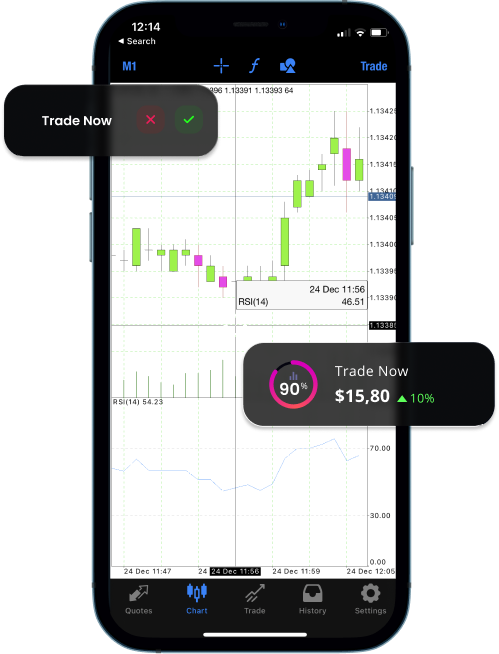
すべての注文タイプと実行モードを実行し、取引の履歴を確認し、履歴データと高度なチャート機能に完全にアクセスできます。

モバイル版では、3種類のチャートが用意されています。

あなたは30個の~にもアクセスできます テクニカル指標 そして、最大10個のインジケーター付きウィンドウを同時に開くことができ、現在行っている操作をより広く把握し、分析能力を高め、取引戦略をより正確に実行するのに役立ちます。ライン、チャネル、幾何学的図形、さらにギャン、フィボナッチ、エリオットツールなど、24種類の分析オブジェクトが取引の精度を高めます。さらに、次の機能にもアクセスできます 金融市場のニュース 他のトレーダーとコミュニケーションを取るために、無料のモバイルチャットとメールも利用できます。

TradingView - Android trading app with real-time market data, charts, and analysis tools.

MT4は、

Green Tick: Symbol of Approval, Success, and Positive Outcome.

Windows,

Green Tick: Symbol of Approval, Success, and Positive Outcome.

MacOS

Green Tick: Symbol of Approval, Success, and Positive Outcome.

アンドロイド,

Green Tick: Symbol of Approval, Success, and Positive Outcome.

各種インターネットブラウザ

なぜAndroid版MetaTrader 4を使うのか?

モバイル取引の最大の利点は、取引口座へのアクセスが簡単であることです。このモバイル取引プラットフォームを使用すると、人気のあるAndroid OSを搭載したデバイスを介して外出先でアカウントにアクセスできます。 MT4 for Androidは、一般的なトレンドインジケーター、オシレーター、ボラティリティ測定など、効果的なテクニカル分析に必要なすべてのツールを提供し、すべてチャート内から直接アクセスできます。AndroidスマートフォンやタブレットでFXを取引し、MT4の優れた機能を探りましょう。

Seamlessly Access and Manage Forex Markets with the Power of Mobile Trading on Android.

MT4 for Android – 特徴

Android用MT4へのログイン方法

A blue and gray sphere with a speech bubble, representing communication and interaction.

Android用MT4プラットフォームの詳細については、FAQページをご覧ください

Seamlessly Access and Manage Forex Markets with the Power of Mobile Trading on Android.

MT4 Androidのユーザーガイド

Android用MT4プラットフォームをダウンロード、インストール、使用する方法については、ユーザーガイドをお読みください

早速開始して、 300以上の商品のCFD取引を優れた取引条件で実体験しましょう。